Projects and Initiatives
CV | Certifications | Contact
Just click on any one image to open it in preview mode. You can use the ‹ › arrows to navigate through the other images and click the ✕ icon to close the gallery. If you want to understand any particular image in detail, a short article is provided below under the same heading, which you can also go through for more information.

1. Login Hours and Calls Count Dashboard (Lead by Me)
Overview
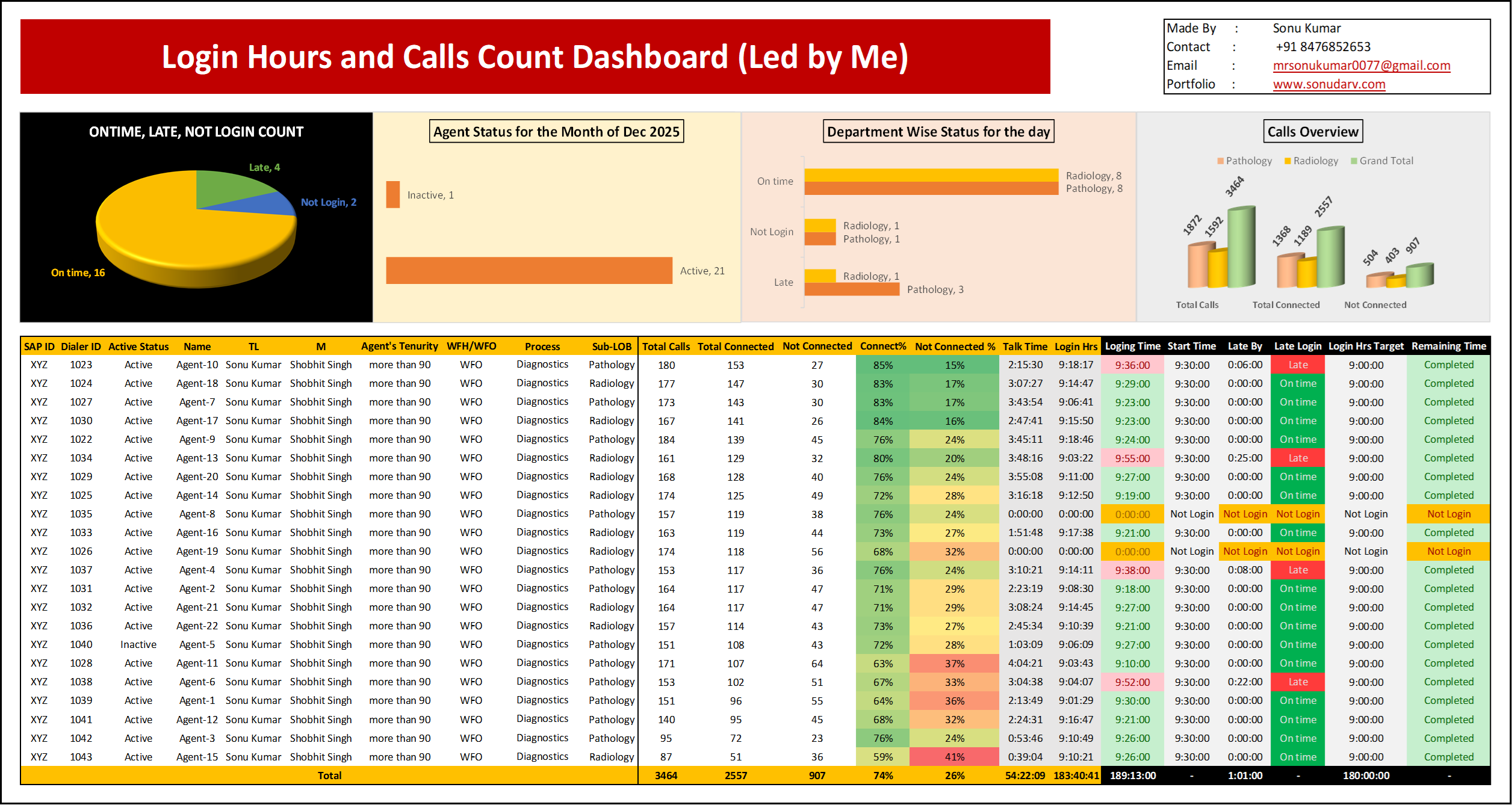
I monitor the dashboard on an hourly basis to ensure that all team members’ login hours are accurate and properly tracked. Through this dashboard, I review how many hours each employee has been logged in, the talk time delivered per hour, and the total number of calls handled. This provides real-time visibility into individual performance and helps quickly identify if anyone’s login time or productivity is below the expected level.
Purpose
Tracked how many agents have logged in in real time
Ensured no agent’s login remains incomplete
Monitored On-Time, Late, Not Login, and Inactive status
Tracked Login Hours vs 9-hour target
Reviewed Total Calls, Connected, Not Connected, and Connect %
Impact
Improved login discipline and shift adherence
Reduced incomplete login hours
Increased accountability across the team
Enabled quick follow-up with non-compliant agents
2. Attrition and Exit Analytics Dashboard-Own Team
Overview
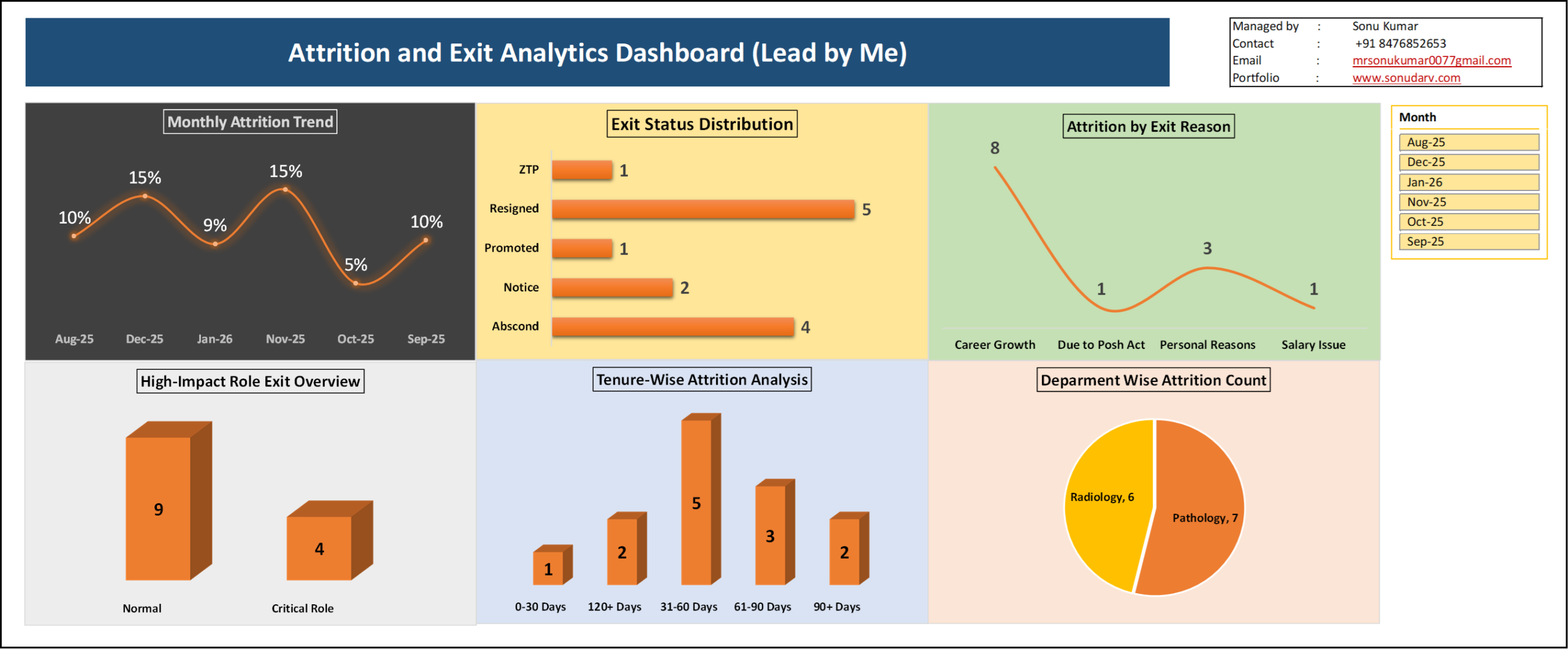
A self-developed analytics dashboard designed for internal tracking of team movement, exit patterns, and workforce stability. This dashboard was created to independently monitor team attrition trends, identify exit patterns, and maintain operational visibility without relying on separate HR reporting systems. It provides structured insights into monthly attrition rate, exit distribution, tenure-based exits, and department-wise movement.
Purpose
The primary goal of this dashboard was to enable proactive tracking of team exits and workforce changes at an operational level. It helps in:
Monitoring team stability month-over-month
Identifying patterns in early exits
Tracking department-wise movement
Evaluating high-impact role exits
Supporting manpower and replacement planning
Key Features
Monthly Attrition Trend Tracking
Exit Status Distribution Analysis
Tenure-Based Exit Pattern Monitoring
Department-Wise Attrition Count
Exit Reason Categorization
Critical vs Normal Role Exit Identification
Interactive Month Filter
Key Insights
Early tenure exits (31–60 days) showed higher frequency
Career growth and personal reasons were dominant exit categories
Certain departments reflected comparatively higher movement
Monthly attrition fluctuations helped identify instability periods
Operational Impact
Improved real-time visibility into team movement
Better workforce planning and replacement readiness
Reduced dependency on manual tracking
Faster decision-making through consolidated data view
Enhanced operational control and transparency
3. Shrinkage % Analysis with Headcount Impact (Lead by Me)
Overview
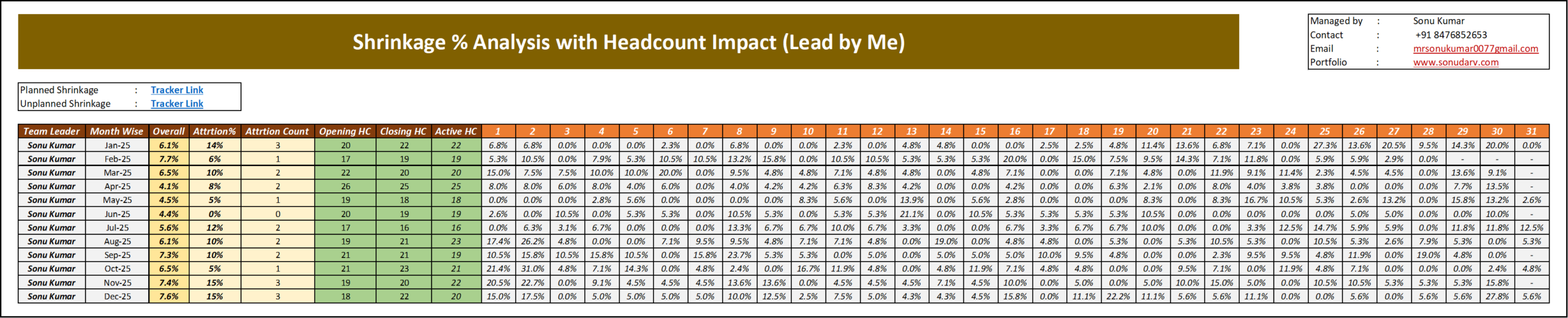
I reviewed monthly shrinkage percentage and headcount movement to understand how they were affecting team performance. The goal was simple — to control shrinkage, manage attrition, and keep active headcount stable so that productivity did not drop.
Understanding the Problem
- Shrinkage and attrition were changing month by month.
- When attrition increased, active headcount reduced.
- When active headcount reduced, performance and targets were affected.
- So, the main focus was to control shrinkage and maintain stable manpower.
The focus was not just on tracking numbers, but on understanding performance gaps and improving them in a structured way.
Studying the Data
Every month, I analyzed:
- Attrition percentage and attrition count
- Opening headcount and closing headcount
- Active headcount
- Daily shrinkage trends
This helped me identify:
- Which months had higher attrition
- When shrinkage was increasing
- How headcount changes were impacting performance
This imbalance created risk for overall team stability and revenue consistency.
The main goal was to bring the entire team closer to 100% achievement and reduce performance variation across categories.
Finding the Reasons
After reviewing the data trends, I identified common reasons such as:
- Sudden resignations
- Leave concentration during certain periods
- Gap between hiring and exits
- Performance pressure during peak time
These factors directly increased shrinkage and affected team stability.
Taking Action
To control the situation, I:
- Conducted regular monthly tracking
- Monitored daily shrinkage trends
- Aligned hiring with attrition trends
- Focused on maintaining stable active headcount
These actions reduced sudden productivity impact.
Result
- Overall performance was strong but still below the full target.
- Shrinkage became more controlled.
- Headcount planning improved.
- Team performance became more stable and predictable.
- Incentive awareness was not fully understood by everyone.
Conclusion
This project demonstrated my ability to analyze workforce data in a clear and practical manner. By consistently reviewing shrinkage and headcount movement, I ensured better manpower stability and smoother performance management.
4. Sales Performance Analysis: Target vs Achievement | Incentive
Overview
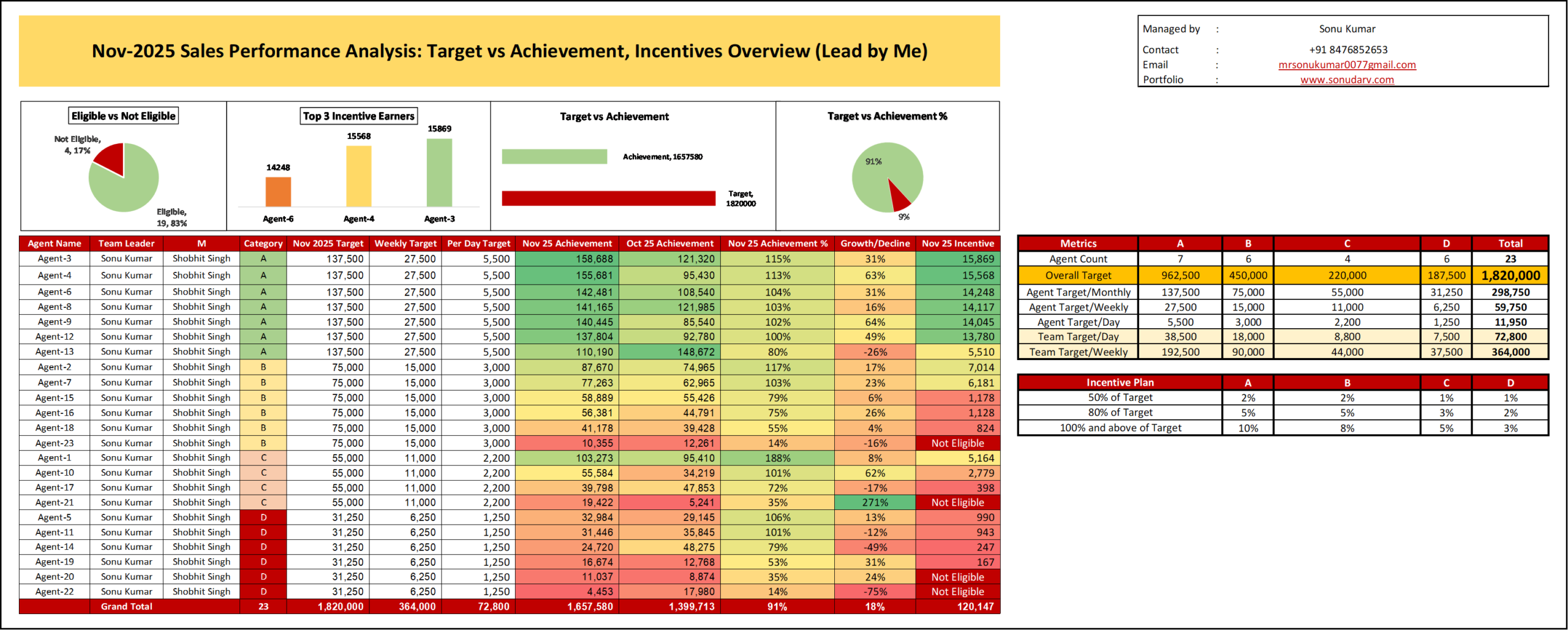
I followed the same structured performance management process every month, and here I am sharing the work and results for Nov 2025. This is the performance of a 23-member sales team with a clear focus on improving target achievement, ensuring accurate and fair incentive payouts, and maintaining a strong tracking system. Every month, I regularly monitored targets, achievements, login hours, call activity, and overall productivity of each team member. This helped me identify performance gaps, provide timely guidance, and keep the team aligned with monthly goals.
Key Performance
- Total Monthly Target: 1,820,000
- Total Achievement: 1,657,580
- Overall Achievement: 91%
- Month-on-Month Growth: 18%
- Total Incentives Paid: 120,147
The focus was not just on tracking numbers, but on understanding performance gaps and improving them in a structured way.
Understanding the Situation
At the beginning of the month, performance levels were uneven:
- Some agents were achieving more than 100% of their targets.
- A few were below 50%.
- 4 agents were not eligible for incentives.
- Revenue contribution was heavily dependent on a small group of high performers.
This imbalance created risk for overall team stability and revenue consistency.
The main goal was to bring the entire team closer to 100% achievement and reduce performance variation across categories.
Building a Clear Tracking System
To gain full visibility, I created a structured dashboard that tracked:
- Monthly, weekly, and daily targets
- Current month vs previous month achievement
- Achievement percentage
- Growth or decline percentage
- Incentive slabs and eligibility
Performance by Category
- Category A: Strong and stable, mostly above 100%.
- Category B: Moderate and fairly consistent.
- Category C: Mixed results with noticeable variation.
- Category D: Most unstable, higher risk of decline.
This structured view helped identify exactly where attention was needed.
Identifying the Performance Gaps
After reviewing the data in detail, several patterns became clear:
- Overall performance was strong but still below the full target.
- A small number of low performers were reducing the total achievement percentage.
- Categories C and D showed higher fluctuation compared to Category A.
- Some agents had sharp month-on-month decline.
- Incentive awareness was not fully understood by everyone.
The issue was not lack of effort, but lack of consistency and structured follow-up.
Actions Taken to Improve Results
Based on the findings, I implemented practical and focused actions:
- Clear Daily Target Discipline
- Each agent worked with fixed daily targets aligned to their category to improve consistency.
- Weekly Performance Reviews
- I conducted focused one-on-one discussions with underperforming agents to identify obstacles and provide direct guidance.
Incentive Awareness and Motivation
- Incentive slabs (50%, 80%, 100%+) were clearly explained so agents could see how performance directly impacted earnings.
- Special Focus on High-Risk Categories
- Monitoring and follow-up were applied to Categories C and D to reduce performance gaps.
Sustaining the Improvement
To ensure long-term consistency:
- Weekly dashboard reviews became standard practice.
- Low-performance agents were identified early.
- Monthly comparison reports were used to track growth or decline.
- Incentive projections were shared to maintain motivation.
The next target is to move from 91% overall achievement to consistently crossing 100%, while reducing dependency on a small group of high performers.
Business Impact
- Clear visibility of team performance
- Fair and transparent incentive distribution
- Early identification of risk areas
- Reduced performance variation across categories
- Structured and repeatable performance management system
Conclusion
This project strengthened performance control within a 23-member sales team by combining clear tracking, data analysis, focused improvement actions, and continuous monitoring. Result was improved growth, better accountability, and a scalable system that can be applied to any sales team aiming for consistent and sustainable performance
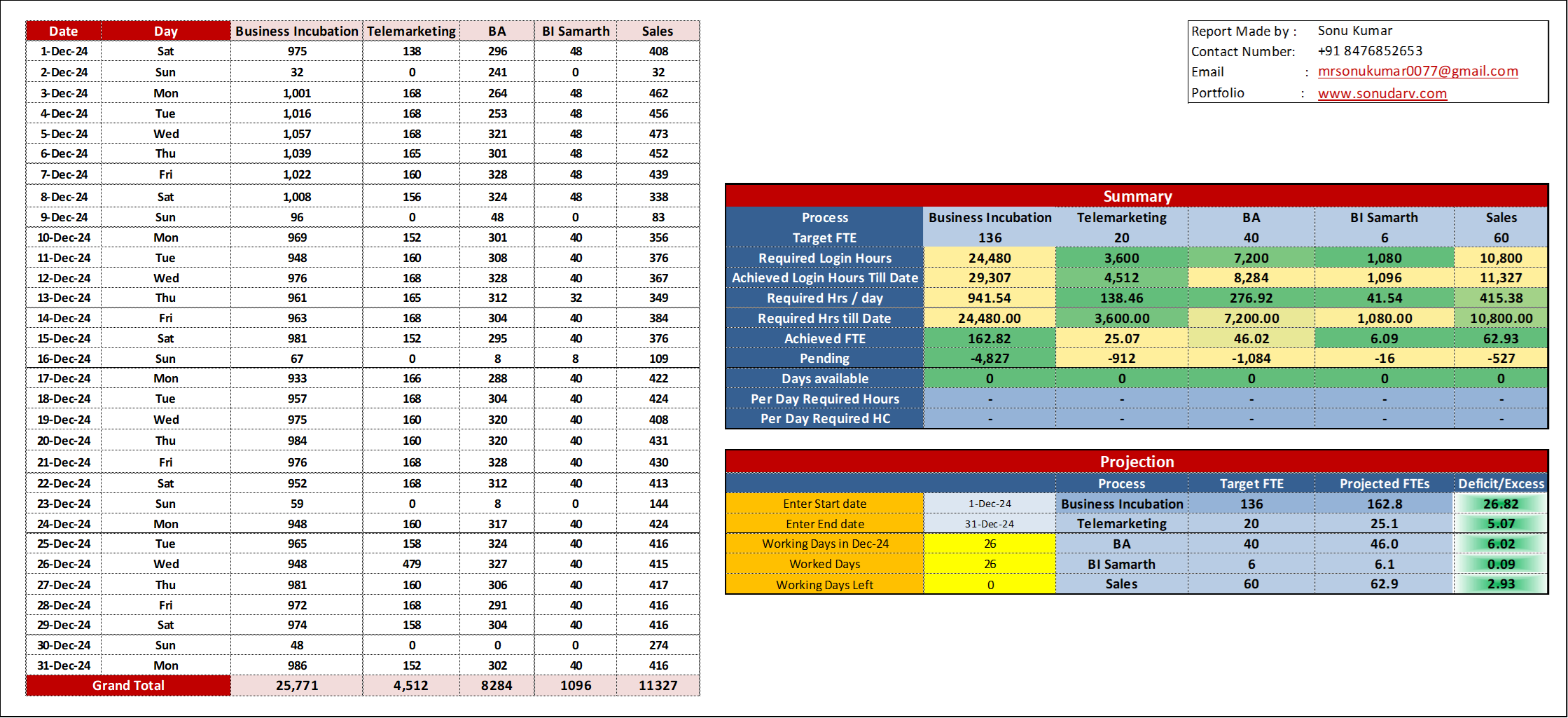
9. Monthly FTE and Login Hours Performance Dashboard
Overview
A structured Workforce Performance Dashboard developed to track Target FTE, Achieved FTE, Required Login Hours, Actual Login Hours, and Month-End Projections across multiple processes (Business Incubation, Telemarketing, BA, BI Samarth, and Sales).
Purpose
This dashboard ensures accurate manpower planning, productivity monitoring, and SLA alignment. It provides clear visibility into workforce utilization and prevents overstaffing or understaffing risks.
Key Features
- Target vs Achieved FTE tracking
- Required vs Actual Login Hours monitoring
- Pending Hours calculation
- Automated FTE conversion
- Month-end projection & deficit/excess analysis
- Working days impact tracking
Business Impact
- Improved workforce utilization
- Better capacity and cost planning
- Data-driven leadership decisions
- Enhanced SLA compliance and revenue optimization
10. Supervisor-Wise and Agent-Wise Attendance Tracking Dashboard
Overview
A dynamic Attendance Monitoring Dashboard designed to track attendance at both Supervisor and Agent levels. It provides detailed day-wise, month-wise, and yearly visibility of workforce availability, leave patterns, and shrinkage impact.
Objective
To ensure accurate attendance tracking, improve manpower planning, and maintain operational stability by monitoring presence, leave, week-offs, and absenteeism trends.
Key Features
Supervisor-wise attendance summary
Agent-wise daily attendance tracker (P, Leave, WO, HD, etc.)
Monthly leave count automation
Yearly leave comparison by supervisor
Dynamic month and team filters
Visual highlights for leave and absenteeism trends
Business Value
Better roster and leave management
Reduced unplanned shrinkage
Improved workforce utilization
Early identification of absenteeism patterns
Stronger SLA and productivity control
This dashboard enables structured attendance governance and supports data-driven workforce decisions at both leadership and team levels.